

Your Will Draft
What happens when your will draft is generated, how long it takes, and what to do if it is slow or does not finish.
Last reviewed
How your draft is generated
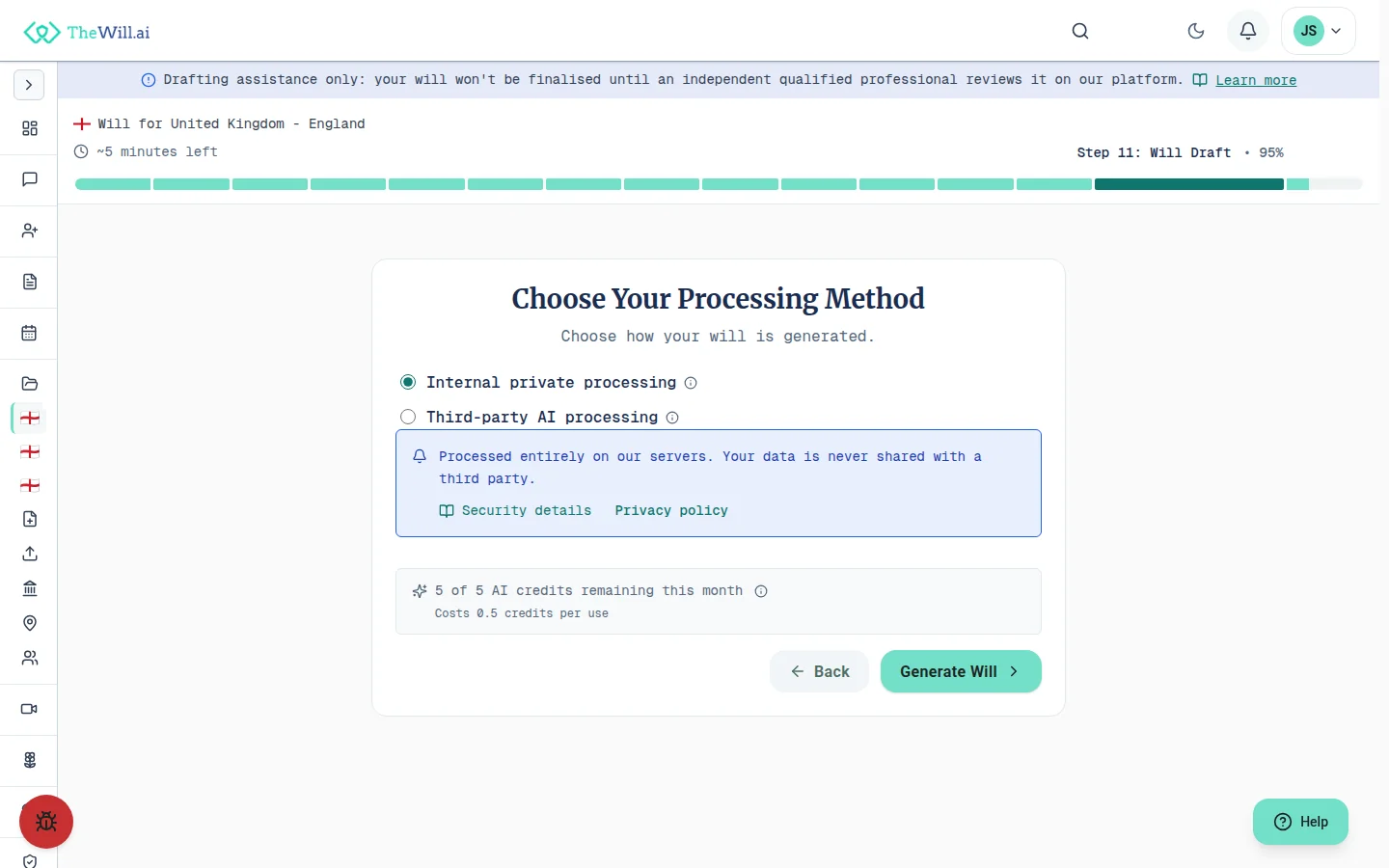
When you reach the "Your Will Draft" step, the answers you have given so far are assembled into a complete will draft with AI assistance. You do not need to write anything yourself at this stage. The draft is prepared for you to review.
What you will see
- A progress indicator showing the stages as your draft is prepared
- Your draft, once ready displayed in full for you to read through
- The option to make changes by returning to earlier steps if something needs adjusting
Keep the page open
While your draft is being prepared, keep this tab open. The page updates on its own as each stage completes, so there is no need to refresh.
How long it takes
Generating a draft usually takes only a few minutes. The exact time depends on how detailed your answers are and which processing option you chose.
Choosing your processing method
Before generation starts you choose how your answers are processed. This choice is yours, and nothing is sent to a third party unless you make it explicitly.
- Internal private processing is the default. Your information stays on our own servers and never leaves them. It can take a little longer to complete
- Third-party AI processing sends your answers to an external AI provider. You must tick a separate consent box before this option can be used, and you choose which provider and model. It is typically the quicker option, and may not be included on every plan
Slower than expected?
If your draft is taking a while, that is normal, especially with internal private processing. The page keeps you informed of progress, so you can simply leave it open and wait. You do not need to do anything.
If generation does not finish
Occasionally a draft cannot be completed in one attempt. If that happens, you will see a message explaining the next steps. Your answers are always saved, so nothing is lost.
Your options
- Try again: choose "Try again" to start generation afresh. Most drafts complete on a second attempt, and attempts that fail do not use up a regeneration
- Check your connection: a stable internet connection helps generation complete without interruption
- Contact Support if it keeps happening: the same screen offers a "Contact support" option. If trying again does not help after a short while, use it and we will look into it
Your progress is safe
Everything you entered in earlier steps is preserved. Retrying generates a fresh draft from the same answers, so you will not have to re-enter anything.
Reviewing and regenerating your draft
Once your draft is ready, read through it carefully. If you spot something you would like to change, you can update your earlier answers and generate the draft again.
Regenerating after changes
- Return to the relevant step and update your answers
- Come back to the draft step and choose to regenerate
- The number of regenerations is limited by your plan. The page shows how many you have remaining, and the regenerate control is disabled once you reach zero
Take your time
There is no rush to finalise. You can review the draft, make adjustments, and regenerate until you are happy before moving on.
Having your will professionally reviewed
After your draft is ready, the next step is to choose a legal professional to review your will. This step is required, not optional: every document we generate must be reviewed by an independent legal professional before you can download, share or finalise it.
Why the review matters
- A professional can check that your draft reflects what you intend
- They can answer questions specific to your situation that a general tool cannot
- Until a review has concluded, your will cannot be downloaded or finalised
General information only
The draft and this guidance are provided for general information and do not constitute legal advice. For advice tailored to your circumstances, consult a qualified legal professional.
Can’t find what you’re looking for?
Our support team is here to help. Contact us and we’ll get back to you as soon as possible.
Contact Support