

My Videos
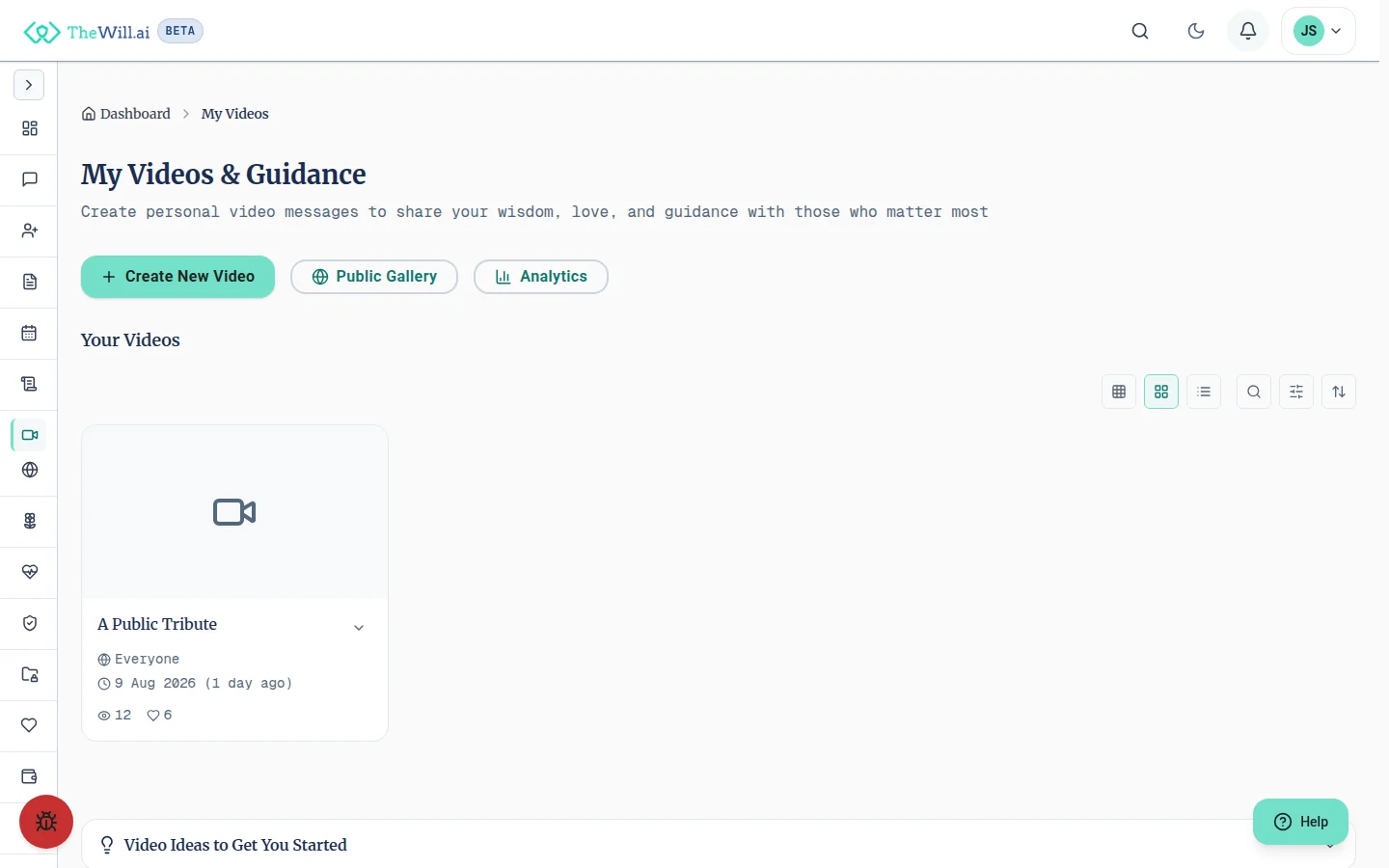
Create lasting video messages for your loved ones with guidance from personalised conversation prompts. Share your wisdom, love, and life lessons in a format that preserves your voice and presence.
Last reviewed
Getting Started
My Videos allows you to record personal messages for specific people or occasions. Here's how to begin:
- Browse video idea categories like Life Lessons, Family Messages, or Special Occasions
- Click on any idea card to start with pre-filled suggestions
- Or click on target audiences to create messages for specific people
- Review and customise conversation prompts before recording
Interactive Conversation Prompts
Our unique prompt system guides you through creating meaningful videos:
Preview & Customise
Before recording, click "Preview & Edit Prompts" to see all questions. Edit them to match your style, add new ones, or remove any that don't apply.
During Recording
Prompts appear as an overlay while you record. Navigate between them at your own pace, skip any you don't want to answer, or minimise them if you prefer to speak freely.
Smart Learning
Your customised prompts help us improve suggestions for everyone. We learn what questions resonate while keeping your personal edits private.
Privacy & Security
Your videos are protected with multiple layers of security:
How are my videos stored?
Videos are stored with server-side encryption in secure cloud storage. Private videos are accessed only through signed URLs that expire after one hour, so only you and the recipients you name can view them. Videos count towards your plan's total storage allowance. Estimate how much storage you'll need.
What do the privacy settings mean?
- Private: Only you can view the video. Perfect for personal reflections or unfinished messages.
- Unlisted: Anyone with the link can view. Share with specific people without making it public.
- Public: Visible in the public gallery. Great for sharing wisdom with the community.
Can I change privacy settings later?
Yes, you can change privacy settings any time. When you change from private to public (or vice versa), the video access is immediately updated. Note that public videos may have been viewed or shared by others.
Important
Frequently Asked Questions
How long can my videos be?
Videos can be up to 60 minutes long. We recommend keeping individual messages between 3-10 minutes for the best viewing experience.
Can I download my videos?
Downloading is off by default. A download option appears on your own video's page only once downloads have been enabled for that video, and the web app does not currently offer a control to switch them on. Your videos stay in your library for you to watch at any time, and you can contact support if you need a copy.
Can I record multiple takes?
Absolutely! Record as many times as you like. You can save multiple versions as private videos and choose which one to share later.
How do conversation prompts work?
Prompts appear as questions during recording to guide your thoughts. You can:
- Preview and edit all prompts before recording
- Skip to the next prompt or go back to previous ones
- Hide prompts entirely if you prefer
- Add your own custom questions
What happens to my videos after I pass away?
Videos are part of your digital legacy. In your will settings, you can designate who should have access to your private videos. Public videos remain accessible to all.
Can I share videos on social media?
Public and unlisted videos have a share link. Use the share button on the video page to hand that link to your device's own share options, or copy it and send it wherever you like, including social media. There are no per-platform posting buttons. Private videos have no share link, so they cannot be shared.
Data We Collect
When you record or upload a video, we collect certain information for compliance and security purposes. Here's what we capture and why:
What information is recorded?
- IP Address: Your internet protocol address at the time of recording
- Timestamp: The exact date and time the video was created
- Device Information: Basic details about your device and browser for playback compatibility
Why do we collect this?
This information helps establish the authenticity and provenance of your video messages. In many jurisdictions, video messages may need to demonstrate when and where they were created. This data also helps protect against fraud and ensures your messages can be verified as genuine. Rules vary by jurisdiction, so consult a qualified professional for advice specific to your situation.
How long do we keep this data?
Compliance data is retained for as long as your video exists on our platform. If you delete a video, the associated compliance data is also removed. For full details on data retention, please see our Privacy Policy.
What are my rights?
You have the right to access, correct, or delete your personal data at any time. You can manage your videos and associated data from your dashboard. For more information about your data protection rights, please review our Privacy Policy.
Ready to Create Your First Video?
Start preserving your voice and wisdom for future generations.
Go to My VideosCan’t find what you’re looking for?
Our support team is here to help. Contact us and we’ll get back to you as soon as possible.
Contact Support